One
The menu bar is the whole product
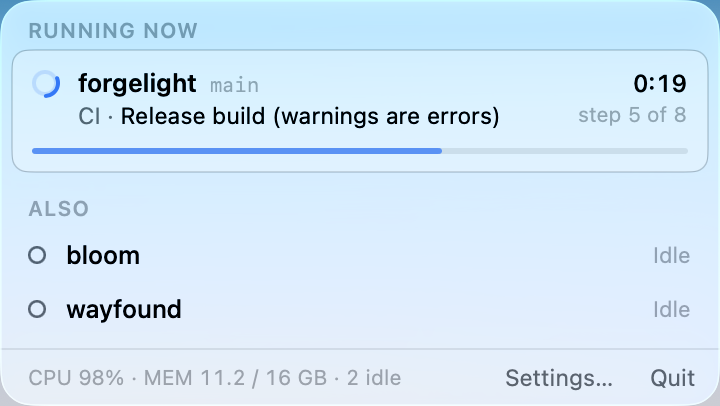
A ring closes as the running job advances through its steps, beside the elapsed time. When nothing is building, the timer disappears and the ring goes quiet. Click it for the full picture: which runner is running which job, for which workflow, branch, commit and pull request, on which step, for how long — and what each runner just finished.
Two
Local first
Runner status, the running job, its current step and its elapsed time all come from files on this Mac. Point ForgeLight at a runner's folder once and it works with no GitHub token at all.
Three
GitHub only when it helps
Add a fine-grained personal access token and ForgeLight asks GitHub for the things only GitHub knows — the workflow name, the pull request, the step count that makes the ring accurate — and asks only while a job is actually running. Idle runners are never polled. Tokens live in your login Keychain and nowhere else.
Quiet by design
ForgeLight is a menu bar app for the self-hosted GitHub Actions runners installed on your own Mac. It reads each runner's own configuration and logs, so you see what is happening the moment it happens — no polling, no dashboard, no tab to keep open.
Watch every runner on the Mac at once, including the awkward case where runners for different repositories share a name. Every job a runner finishes is kept for thirty days, folded into its workflow run.
ForgeLight is for people who run their own CI hardware — a Mac mini in the corner, a Mac Studio under the desk — and want to know, at a glance, what it is doing.
ForgeLight reads only the folders you choose. It runs no background agents, installs nothing outside itself, and sends nothing anywhere except the GitHub API requests you configure it to make.
Requires macOS 15 or later.